Thursday, December 9, 2010

Why online retailers shouldn't charge for returns

Why online retailers shouldn't charge for returns: "

Even if a customer has had an excellent experience with a retailer through the buying and delivery process, returns is one area where things can go wrong.


Making the returns process easy and free for customers is one way to ensure they retain a positive impression of a retailer, even if the product wasn't suitable for them. This makes is more likely that they will return and make purchases in future.


Charging for returns is one sure-fire way to annoy customers and deter them from future purchase, so I've been looking at etailers' returns policies to see which ones are doing this...

I recently purchased (well, my wife did...) a lamp shade from Graham & Green only to find that it was too big for the lamp when it arrived. Having checked the website I was advised to use the returns label and send the item back.


I was forced to call customer services (which meant ten minutes in a call queue) and was then told they would collect the item and refund it, but would charge me £10 for this and deduct this from my £40 refund.


I understand that Graham & Green has costs to cover, but such a hefty charge for a return is likely to make me think twice before ordering anything from that site again.


The fact that this charge is not made clear in the returns policy is also annoying:


Returns Graham&GReen


Retailers should do everything they can to minimise returns rates, by providing detailed product information, images, and product videos (the instructional product videos used by Simply Piste have done wonders for its returns rates), but a proportion of customers will still want to return items.


This may be because clothes don't fit as well as they thought when they try them on, something just doesn't look right when they see it at home, or it may be an unwanted gift - and there'll be plenty of them this Christmas.


While retailers have costs to cover, it may well be better to loom at average returns rates and factor this in to the costs of items and initial delivery charges rather than penalise customers for returning items.


I've been seeing how some online retailers handle this issue of returns...


Argos


For a multichannel retailer like Argos, the fact that customers can return items to their local store can make the process a lot easier for customers, and it is essential that multichannel retailers provide this option.


For customers that prefer not to return items to a store, Argos makes it nice and easy. Customers simply need to call up within 30 days to arrange a free collection. This is how it should be done.


returns2


M&S


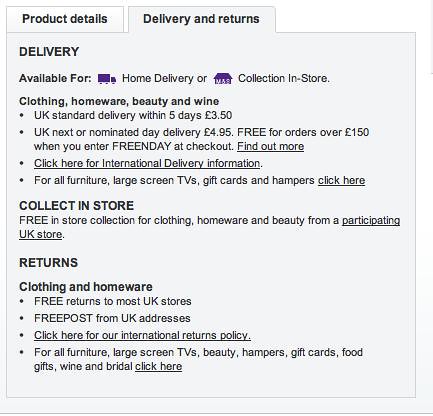
Marks & Spencer has always had a no-hassle returns policy in its stores, and the online version is simple enough. The retailer offers free returns to stores or via freepost. Not as easy as having a collection arranged, but at least customers incur no costs.


Returns m&s


John Lewis


The John Lewis returns policy is stricter, and will only refund the initial delivery charge if they are notified of a return within seven days of purchase. It isn't clear whether or not the costs of returning the item are covered by the retailer.


Next


Next will collect any items you need to return, but will charge you if you want a refund for all of the items in your order. At £3.99, at least this charge isn't too steep, and there is a free return to store option.


returns next


Sports Direct


Sports Direct's returns policy, shown on its product pages, is one that could deter customers from a purchase. The tone seems pretty harsh, and customers returning items will be charged for the initial delivery, and will have to pay the costs of return themselves.


returns sports direct


Webtogs


I like the fact that Webtogs uses its 'zero hassle' returns policy as a selling point. It displays this clearly on the homepage and product pages:


returns7


There is a tiny bit of hassle though, as customers are charged £2.20 to return items, though at least this charge isn't too steep.


Glasses Direct


Glasses Direct is one company which has gained an excellent reputation for customer service, and its returns policy is as you would expect from such a retailer.


returns9


Glasses Direct gets around the fact that customers cannot try glasses on before they buy with a free returns policy, prominently displayed on the website.


Retailers need to work hard to retain customers, and a free returns policy is one way to achieve this. If customers know that they can return items if they need to, they're far more likely to make a purchase in the first place.


If charges for returns are steep, or they have to work too hard to return items, then this negative experience means they may not use that retailer again, online or offline. Retailers need to weigh up the cost of covering returns charges against the risk of losing customers.

"

Google Instant Previews - The Nail in the Coffin for Flash?

Google Instant Previews - The Nail in the Coffin for Flash?: "

Posted by dominic.gluchowski

In recent years both Google and Apple have been strong advocates of HTML5 - a new HTML standard which includes features like video playback and drag-and-drop. Many believe that HTML5 will be a replacement for third-party browser plug-ins such as Adobe Flash and Microsoft Silverlight.

Google has just introduced Google Instant Previews where the websites can be previewed straight from Google's search engine page. Google claims that this new feature makes searchers 5% more likely to be satisfied with the results they click.

Interestingly enough, Google Instant Previews does not show a number of flash sites including those of Pepsi, SAAB, Jeep Australia, and HBO, just to name a few. However, there are exceptions such as Insure My Ride and Jeep USA. Despite this, even with Jeep USA, Google shows only the start of the Flash animation, which means that the preview page is almost blank.

In addition, Google Instant Previews does not display Flash components on websites, i.e. the main banner on disney.go.com. I'm not a website developer, and I'm definitely not a flash expert, so I would love for someone to help me understand why Google displays certain flash sites and not others eg. Insure My Ride?

Examples of Google Instant Previews Flash failures:

  • Pepsi

Pepsi Google Instant Preview Screenshot

  • SAAB

SAAB Google Instant Preview Screenshot

  • JEEP Australia

Jeep Australia Google Instant Preview Screenshot

  • HBO

HBO Google Instant Preview Screenshot

  • Disney

Disney Google Instant Preview Screenshot

Examples of working Flash Google Instant Previews:

  • Insure My Ride:

Insure My Ride Google Instant Preview Screenshot

  • Jeep

Jeep Google Instant Preview Screenshot

The Effect of Activating Google AdWords Sitelinks

The Effect of Activating Google AdWords Sitelinks: "
Posted by Petter El Fakiri
This post was originally in YOUmoz, and was promoted to the main blog because it provides great value and interest to our community. The author's views are entirely his or her own and may not reflect the views of SEOmoz, Inc.
Around one year ago Google announced that sitelinks could be added to Google AdWords ads. What's the effect of this feature on users' click patterns?
A company I have been working with activated sitelinks in their AdWords ads on search for CompanyName. They also ranked #1 organically on this search phrase. From experience it is smart to advertise with the company name as long as the paid clicks are cheap and give the AdWords campaign high quality. But was it right to activate sitelinks as well?
Having activated sitelinks, the company soon experienced a substantial change to their click profile for users coming from Google. Sitelinks were disabled for the company name after 11 days, it was time to dig in and investigate the effects.
The two following graphs show the traffic from Google where the search keyword is CompanyName. The first graph shows traffic from Google AdWords and the second traffic from organic Google. The effect on traffic from Google is obvious.
Visits from Google AdWords - search phrase "CompanyName"
Visits from Google Organic - search phrase CompanyName
During the period with sitelinks enabled, traffic from Google AdWords dramatically increases, while the organic traffic decreases.
Below is a comparison of the traffic before AdWords sitelinks where enabled and the traffic during activation. Both graphs show traffic from Google on CompanyName search. As you can see; between the periods the total traffic from Google on search phrase "CompanyName" is up less than 1%. The periods have comparable traffic quantities.
Comparison - period with and without Google AdWords Sitelinks
In the period when AdWords Sitelinks was active there was a 91% increase in traffic from Google AdWords, shown by the next graph. This translates to about 2700 hits per day for this single search term.
Change in traffic from Google AdWords in the two periods
Finally the following graph illustrates what happened to organic traffic during the same two periods. The traffic is down almost 25% on searches for CompanyName, where the last period is the one where sitelinks was enabled in AdWords.
Change in traffic from Google Organic
Pretty pictures are one thing, but often the numbers can be more persuasive:
The statistics show that the number of visits from organic search is down by roughly the same amount that the traffic from paid search is up.
Assuming a CPC of 0,30NOK (about 5 cents) on CompanyName in AdWords, means 300.000 NOK ($ 50 000) per year in extra Google AdWords cost if our client activates Google AdWords Sitelinks. With no traffic increase to show for it!
Considering Google allowed purchasing of competitors names in our corner of the world about two months ago, this will probably drive the CPC for company names up significantly.
Increased cost for the company aside, the changed click pattern is also noteworthy from a SEO perspective. During the period without AdWords Sitelinks the ratio between organic and paid results was 78/22, which is close to what SEO's consider a normal distribution. When AdWords Sitelinks where active the ratio changed to 59/42. Google has drastically changed the click pattern by allowing Sitelinks in AdWords ads, at least in this case.
Are Sitelinks something to avoid? Of course not! There are many solid and valid arguments for ads using the company name with Sitelinks enabled. The clicks are often cheap, they always have high CTR and ranking. This is the foundation for a well managed AdWords account of high quality, good ranking and nice click prices once the whole account is considered.
Please let us know if anyone else has similar experiences with Google AdWords Sitelinks.

Google AdWords Adds Automated Rules

Google AdWords Adds Automated Rules: "The Google AdWords Blog announced a new and very useful feature for AdWords advertisers on how to manage their accounts without them actually having to login and make changes on a daily basis. The new feature is named AdWords Automated Rules and is currently available to some advertisers,...


Please visit Search Engine Land for the full article."

Monday, December 6, 2010

Facebook Profile Page Update of the Day: Facebook just released...

Facebook Profile Page Update of the Day: Facebook just released...: "

Facebook Profile Page Update of the Day: Facebook just released a video featuring a brief demo of its brand new profile page, ahead of tonight’s 60 Minutes interview with Mark Zuckerberg, set to air at 7 PM ET/PT

The redesign is expected to be officially rolled out tomorrow, but you can activate the changes (and learn more about what they are) right now by clicking here.

Thursday, December 2, 2010

Follow Up of the Day: Looks like Kim Kardashian and her Digital...

Follow Up of the Day: Looks like Kim Kardashian and her Digital...: "

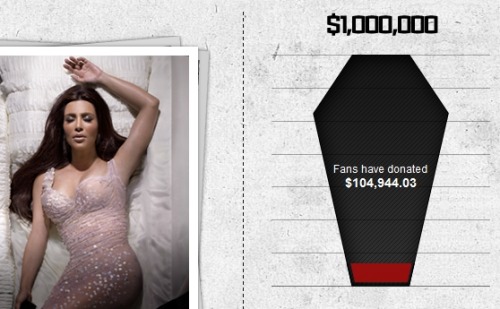
Follow Up of the Day: Looks like Kim Kardashian and her Digital Death compatriots aren’t doing so well. With less than an hour to go on the East Coast before World AIDS Day becomes International Day for the Abolition of Slavery, the shameful ploy to demand cash from fans in exchange for fatuous tweets appears to have bombed in a rather spectacular fashion.


The most notable thing to emerge from this experiment is how, in the span of 24 hours, with millions upon millions of followers among them, these celebs were only able to collect about as much money as one of them makes in a minute.


Hey famous people, here’s an idea: Instead of using your limelight to shuck cash off common Internet folk, maybe you pull out your gilded checkbooks and donate the million dollars out of those fortunes happenstance so graciously awarded you.


Oh, and don’t you dare come back online before that insensitive coffin fills up. You owe those poor kids that much.


[buylife.]


"

Top 10 Must Have SEO Extensions for Google Chrome


Every few years I make a browser switch and my web use evolves sometimes for the better, and sometimes for the worse. My particular evolution went something like this: Netscape, IE, KDE Konquerer (switched from Windows98 to Debian - so no more IE), Mozilla Phoenix (early Firefox), IE (what do you know... went back to Windows), Firefox, IE, Firefox, and over the last year Chrome. My latest switch to Google Chrome has had the biggest affect on my daily web usage, particularly from the amazing assortment of extensions. The browser is also light and stylish with cool themes. If you haven't tried it already I highly recommend you do. With Chrome quickly gobbling up market share, it's clear I'm not the only one who's recognizing this.
Ok, enough of this Google fanboy madness... let's talk about some SEO tools. Google Chrome's Extensions, much like Android's Apps, are full of garbage with a few gold nuggets hidden amidst the madness.
1. MozBar
Yes, this is SEOmoz, so you might expect this to be top of the list. However, SEOmoz has done an exceptional job with this tool. Before becoming a Pro Member I used it daily and now that I'm a pro member it's always on it. Note: I'm not just saying this to get my blog post boosted to the main blog (wink wink), but it really is the best tool out there and an essential for tool any aspiring SEO.
2. SEO Site Tools
SEO Site Tools is an all inclusive powerhouse of SEO information. It includes 6 main sections:
  • External Page Data
  • Page Elements
  • Social Media
  • Page Terms / Tools
  • Server / Domain Info
  • Suggestions
Some of the unique features and enhancements include highlighting your domains in Google search, trend data in Google webmaster tools, and Social Media stats in Google Analytics. A close second to MOZbar, this tool is an absolute must.
3. Note AnyWhere
I don't know if I'm the first to break news of this tool. But even if you hate Chrome, this tool makes it all worth it. It's basic, it's simple, but it has already completely changed the way I work. As the name says you can leave a note... that's right, anywhere. On any page, on any site... leave... close your browser and come back 2 days later. I just left a note on my home page with new keywords I want to target and a note on my Fantasy Football page with all the players I need to drop (sorry Randy Moss).
4. Firebug
Get down and dirty with your code or your competitors code. You'll be able to find the tweaks and tags that can boost your rankings. Not for the beginner but an absolute must for the OCD expert.   
  
5. IE Tab 
Another holdover from Firefox, IE Tab allows you to browse the web as if you were using IE. I use this extension at least twice a day to confirm page appearance, double check a ranking, or if Chrome is having an issue with loading a page.
6. SEO SERP 
I've found this tool to be slightly buggy. However, the usefulness is there and I'm sure they'll iron out the issues soon. Basically what it does is it allows you to check your search rankings per term. Quick and simple, definitely saves time for those of us that occasionally get addicted to checking rank.
7. Goo.gl URL Shortener
Shorten URLs on the fly, add them to history, integrate with social media... do I really need to explain this further? It's a time saver.
8. Screen Capture (by Google)
No more CTRL+ALT+PRTSCN, this simple tool by Google let's you highlight the section of the page you want, highlight the visible area, or highlight the whole page (can't do that with PRTSCN - that I know of). After you select, annotate, highlight, mark it up however you'd like and then email it to that lazy coworker who can't find the broken link or misspelled keyword. It's like slapping them... nicely.
9. Google Reader
Let's face it, there's a lot of information out there for SEO, it's a highly dynamic industry and you need to be on top of your game to stay in it. Google reader is the essential tool
10. Stay Focused
Ever spend 3 hours trying to figure out which who to trade Randy Moss for on Fantasy Football? Nah, me neither... this little tool will help with all that though. Get back to your link building, get back to your analytics, and StayFocused. OK, honesty time... I ended up disabling this tool... but you shouldn't, it's awesome and works better than you think it will.
Well as I'm sure you know by now there's a ton of tools out there, and while Chrome and its extensions are just one of them, I think they're worth a try... and no... I don't work for Google. I'd love to hear your recommendations as well.
Cheers,
Patrick Ahler - www.NinjaWeb.com

Disqus for ully's online marketing

Disqus for ully's online marketing